


 Medically Cited
 0 Reviews
  Specs
Specs Ask a Question
 Write a Review
In This Review
Overview
It’s a weekend, nothing on your to-do list. You’re squinting at your phone while tilting your head to catch the TV screen.
The constant strain, the blurry ‘in-between’ vision, and the fact that you have to switch glasses…it’s annoying; enough to ruin a perfectly good day.
You need Hewelth OptiReaders Pro. These multi-distance glasses are here to simplify your life, giving you crystal-clear vision whether you’re scrolling, working, or watching your favorite show. No more switching glasses, no more headaches, just the clarity you’ve always wanted.
Let’s talk about it.
What Is Hewelth OptiReaders Pro?
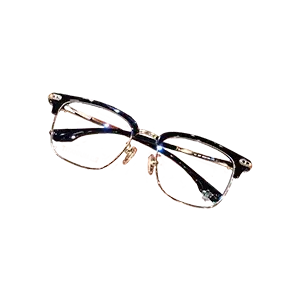
Hewelth OptiReaders Pro are progressive multifocal glasses designed to help you see clearly at any distance. Whether you’re reading, working on a screen, or looking across the room, these glasses adjust to your needs without you having to switch pairs.
They block 100% of blue light, which helps reduce eye strain during long hours on digital devices.
The frames are made from lightweight titanium, so they’re durable but comfortable enough to wear all day. Unlike traditional bifocals, these have no visible lines, so you get a clean, modern look.
How Does Hewelth OptiReaders Pro Rate?


Brand Highlights
- Offers podiatrist-recommended, at-home solutions.
- Boasts Safe, non-invasive, and dermatologist-approved products.
- American-owned with a focus on quality and durability.
- Backed by a 30-day money-back guarantee.
Pros
- Progressive multifocal lenses for seamless vision at all distances
- 100% blue light blocking to reduce eye strain
- Lightweight, durable titanium frames
- No visible bifocal lines for a modern look
- Comfortable fit for all-day wear
- Affordable alternative to prescription glasses
Cons
- Not suitable for driving if you have myopia
- May take a few hours to adjust to the lenses
About the Manufacturer
Hewelth is a U.S.-based company known for quality and practicality. Everything, including the OptiReaders Pro, is designed in the USA. They stick to strict production standards, so you know you’re getting something reliable.
They also back their products with a 30-day money-back guarantee, which says a lot about their confidence. Hewelth isn’t flashy, but they’ve built trust with thousands of happy customers who keep coming back.
How Does Hewelth OptiReaders Pro Work?
Hewelth OptiReaders Pro use progressive lenses to provide clear vision at all distances.
Whether you’re reading, working on a screen, or looking far away, the lenses adjust seamlessly. They also feature light-adaptive technology, which changes the lens tint based on lighting conditions to reduce glare.
The glasses block 100% of blue light, helping to reduce eye strain during long hours of screen use. The lightweight titanium frames are durable and comfortable for all-day wear. These features work together to offer a practical solution for everyday vision needs.
What Makes Up Hewelth OptiReaders Pro – Are They Safe & Effective?
Progressive Multifocal Lenses
These lenses help you see clearly at any distance. Whether you’re reading, working on a screen, or looking far away, they adjust to your focus. No need for multiple pairs of glasses which makes everything easy and convenient[1].
Intelligent Photochromic Technology
These lenses adapt to changing light conditions. They darken in bright sunlight and return to clear indoors, reducing glare and eye strain. You’ll especially need this for outdoor activities or when transitioning between environments.
100% Blue Light Blocking
The glasses block harmful blue light emitted by screens. This helps reduce eye fatigue, headaches, and potential long-term damage caused by prolonged screen exposure. It’s a practical feature for anyone spending hours on digital devices.
Ultra-Light Titanium Frame
The frame is lightweight and durable. It’s comfortable for all-day wear and strong enough to handle daily use without bending or breaking.
How to Use Hewelth OptiReaders Pro?
Step 1: Put Them On
Start by wearing the glasses like any regular pair. Adjust the fit so they sit comfortably on your nose and ears.
Step 2: Let Your Eyes Adjust
When you first use them, give your eyes a little time to adapt to the progressive lenses. Look through different parts of the lens to find the right focus for reading, screens, or distance.
Step 3: Use in Different Settings
Wear them indoors or outdoors. The photochromic lenses will adjust to light changes, so you don’t need to switch glasses.
Benefits Of Hewelth OptiReaders Pro
- Clear vision for all distances: The progressive lenses let you see up close, far away, and everything in between. No need for multiple glasses.
- Adapts to light automatically: The photochromic technology in the lenses automatically adjusts to lighting conditions. They darken in bright sunlight to reduce glare and return to clear indoors.
- Reduced eye strain: By blocking 100% of blue light, these glasses help reduce eye fatigue and discomfort from long hours on screens.
- Practical and versatile: With features like progressive lenses, light adaptation, and blue light blocking, these glasses are designed to simplify your life. They’re a single solution for multiple vision needs.
Safety Of Hewelth OptiReaders Pro
Hewelth OptiReaders Pro are built for safe, everyday use. The materials are tested and durable, and they are reliable and safe for all ages. The lightweight frame sits comfortably without causing pressure, even when you wear it for long periods. The lenses block blue light, which helps reduce strain from screens without any risks.
Hewelth OptiReaders Pro Price
A single pair of Hewelth OptiReaders Pro costs $49.99. If you’re looking for better value, you can choose from the following bundle options:
- 2 Pairs: $79.99 total ($39.99 per pair), saving you 60%.
- 3 Pairs: $89.98 total ($29.99 per pair), saving you 70%.
- 4 Pairs: $109.97 total ($27.49 per pair), saving you 73%.
How Effective Is Hewelth OptiReaders Pro?
Hewelth OptiReaders Pro works. People say they notice sharper vision and less strain almost immediately. The lenses make it easy to switch focus between distances, and the light-adaptive feature works smoothly.
Previous users also talk about wearing them all day without discomfort, which says a lot. So, the feedback is overwhelmingly positive. Hewelth OptiReaders Pro seem to do the job well.
Hewelth OptiReaders Pro Review – FAQs
Q: Do Hewelth OptiReaders Pro work for people with astigmatism?
A: No, Hewelth OptiReaders Pro are non-prescription glasses designed for presbyopia. They don’t correct astigmatism or other complex vision issues. For such conditions, prescription lenses are recommended.
Q: How long does it take to adjust to progressive lenses?
A: Most users adapt within a few days to two weeks. During this time, you may notice slight blurriness or a ‘swim’ effect when moving your head. Consistent wear helps speed up the adjustment.
Q: Are Hewelth OptiReaders Pro suitable for people with sensitive skin?
A: The frames are made from hypoallergenic materials, and the silicone nose pads are soft and gentle, making them suitable for most people with sensitive skin.
Q: Can I use Hewelth OptiReaders Pro if I already wear prescription glasses?
A: Hewelth OptiReaders Pro are non-prescription glasses designed for presbyopia. If you have a complex prescription or conditions like astigmatism, these glasses won’t replace your prescription lenses.
What Do Hewelth OptiReaders Pro Reviews Say
Here are some of the top user comments we singled out;
The glasses were fine for the purpose for which I purchased them – reading while on the computer. They fit nicely and deliver multi-focal as advertised. I hardly ever take them off. Great eye-where. – Mary J.
I was very pleased with these glasses. These glasses work as well as my $100 prescription glasses. Wear them all the time! They cover distance nicely, up close, etc. These glasses are good if you don’t have a lot of money to spend. – John S.
Hewelth OptiReaders Pro Review – Conclusion
Hewelth OptiReaders Pro is the solution to a problem many of us face daily: the need for clear, uninterrupted vision at any distance. These glasses combine progressive lenses that adapt to your focus with a lightweight, durable frame that feels natural to wear all day.
You’ll be going about your day without having to worry about switching glasses or straining your eyes. We especially loved them for their practicality. You can use them for reading, working, or simply looking up to engage with the world around you. Give them a shot.
Where To Find It?
You can BUY it directly from the Official Website
Product reviews are provided for informational purposes only and reflect solely the views and opinions expressed by the contributors and not those of Consumer Health Digest. We do not verify or endorse any claims made in these reviews. Please read the full product reviews disclaimer. *All individuals are unique. Your results can and will vary.
 Ask a Question
Have a Question? Please Tell Us What We Are Missing Here!
Upload Your Video Review
How to record video?
- Prepare your device, ensuring it's charged and has enough storage.
- Find a quiet, well-lit space with natural or good indoor lighting.
- Position your device and frame yourself in the center with head and shoulders visible.
- Introduce yourself, the product, and why you chose it.
- Share your experience, including positives, negatives, and recommendations.
- Test audio and video to ensure they're working properly.
- Keep the video concise, aiming for 1-3 minutes.
- Review your recording for quality and clarity.
- Upload your video.
Video recording details:
- Video duration: 1 - 3 minutes
- Video Quality: Full HD (1080p and above)
- Video format: MP4
- Audio Quality: Clear without background noise
1 Sources
We review published medical research in respected scientific journals to arrive at our conclusions about a product or health topic. This ensures the highest standard of scientific accuracy.













Customer Reviews & Ratings
1 out of 5Review this Product
Leave a review and share your experience with others.
Write a Review
How to Upload your Proof of Purchase:
Please follow the instructions listed below to upload your electronic proof of purchase.
If you are still not able to upload your proof of purchase, please contact us for further assistance (take a moment to look over the sample bill below).